Define the layout
"One full-body three-quarter view on the left" specifies both the view and its position. "Two expression portraits on the right" gives the remaining space a clear purpose.
Create anime images. Keep building your story.
Create anime images with NovelAI in OiiOii. Save your results, then continue with storyboards and your choice of video model.
Generation uses Credits.
Explore character designs, two-person scenes, and fantasy illustrations. Try the prompts, see what each instruction controls, and adapt the details to your own idea.
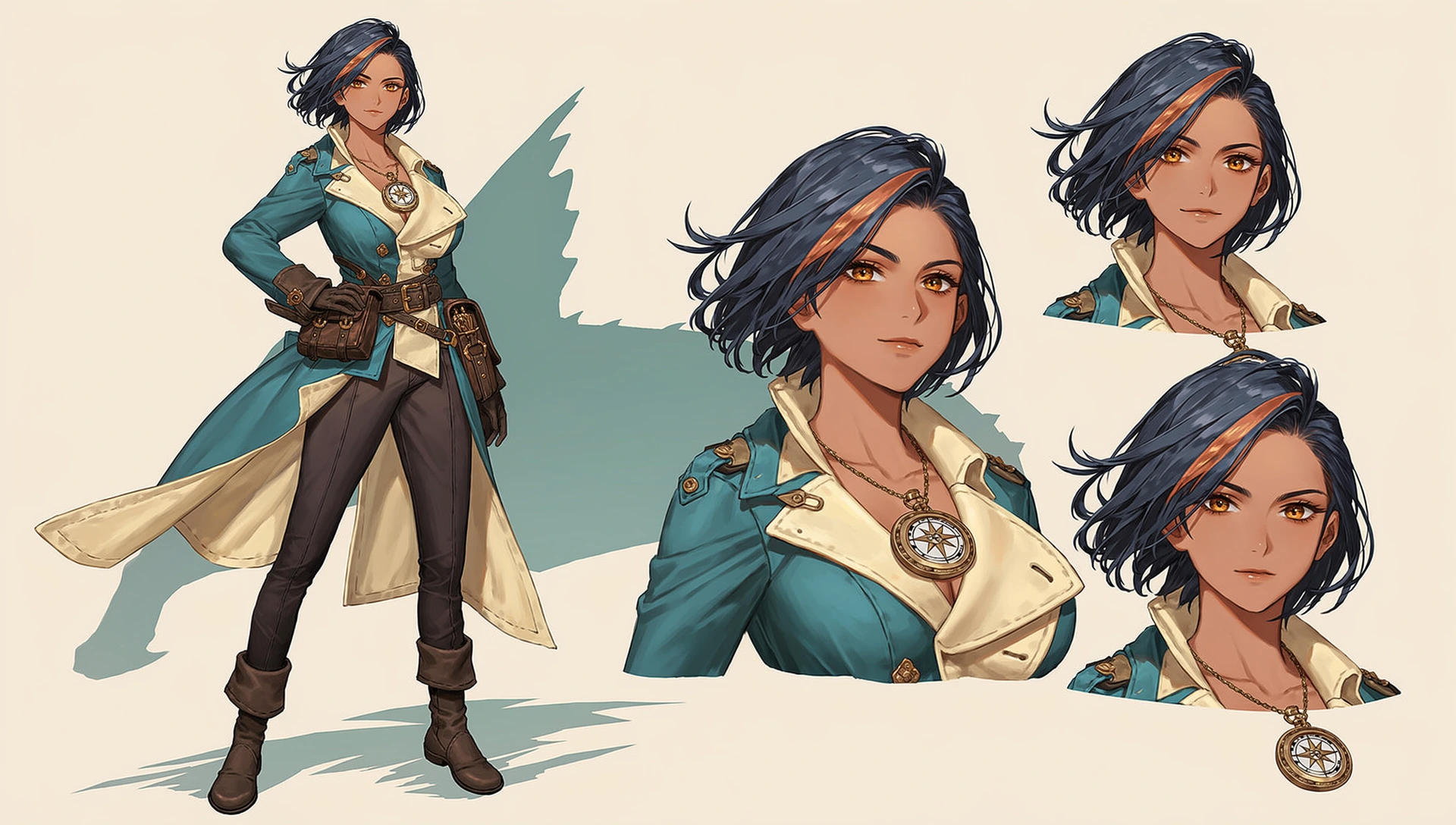
“Give your character a recognizable identity, then specify how each view should appear on the sheet.”
Anime character design sheet, landscape 16:9. Show the same adult female sky courier in one full-body three-quarter view on the left and two expression portraits on the right.
In every view, she has warm brown skin, short midnight-blue hair with one copper streak, amber eyes, and a teal travel coat with cream lining. Include dark trousers, sturdy boots, a brass compass pendant, and a leather satchel in the full-body view.
Keep her hair and boots inside the frame. Separate the views with clear empty space on a plain ivory background. Use clean anime linework and cel shading. No text or panel borders.
"One full-body three-quarter view on the left" specifies both the view and its position. "Two expression portraits on the right" gives the remaining space a clear purpose.
"In every view" connects the same hair, eyes, and coat to each appearance. Change the expression or pose while keeping these recognizable details in the prompt.
"Hair and boots inside the frame" turns "show the whole character" into a specific requirement. If the figure is still cropped, remove close-up instructions and simplify the layout.
Give the courier a new profession by replacing "a brass compass pendant and a leather satchel" with:
A silver academy badge and a leather case for magical instruments.
Keep her appearance and the layout unchanged while you explore the new accessories.
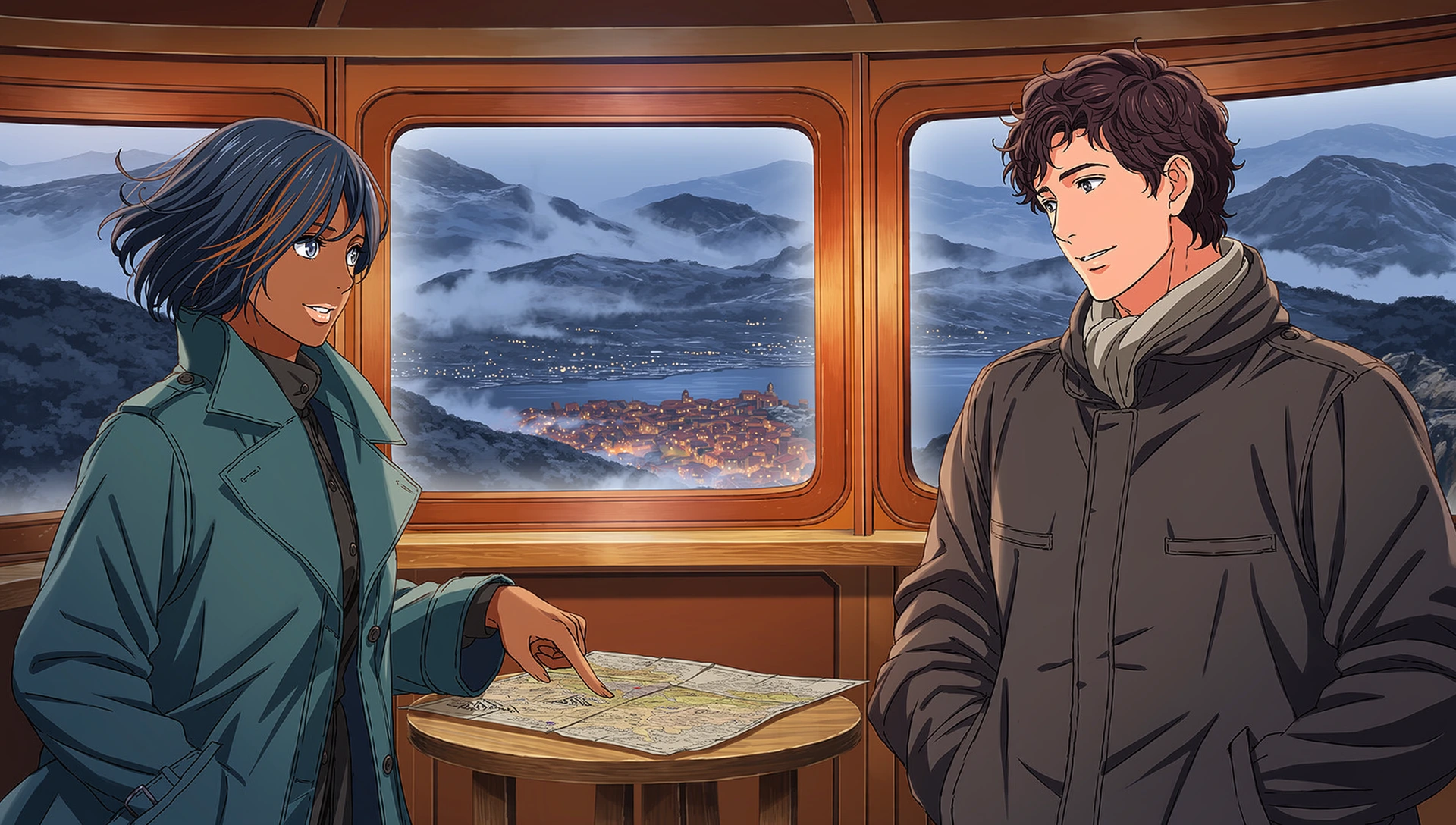
“Describe who does what, where the shared object sits, and what each person is looking at.”
A single cinematic anime illustration, landscape 16:9. Two adult travelers plan their next stop inside a mountain train at blue hour.
On the left, a woman with midnight-blue hair and a teal coat points to a destination on a map. The map lies flat on a small wooden table between them. On the right, an auburn-haired man in a charcoal jacket keeps both hands in his pockets. Both look down at the map with hopeful smiles.
Use a waist-up two-shot with both faces and the map visible. Soft neutral light on their faces, warm carriage lights, cool mountains outside. Clean anime linework and cel shading. One continuous scene, no text or collage.
"On the left" and "on the right" connect each character to a separate action. This makes the interaction more explicit than "two travelers discussing their journey."
"The map lies flat on a small wooden table" establishes its position and support. Neither traveler needs to hold it, keeping the hand-and-object arrangement simple.
"Both look down at the map" aligns their attention with the action. Asking them to study the map and look into each other's eyes at the same time creates conflicting directions.
To show the travelers spotting their destination, replace the pointing and gaze instructions together:
The woman points through the window toward a distant illuminated town. Both travelers look toward the town with hopeful smiles.
Remove the old instructions to point at and look down at the map.
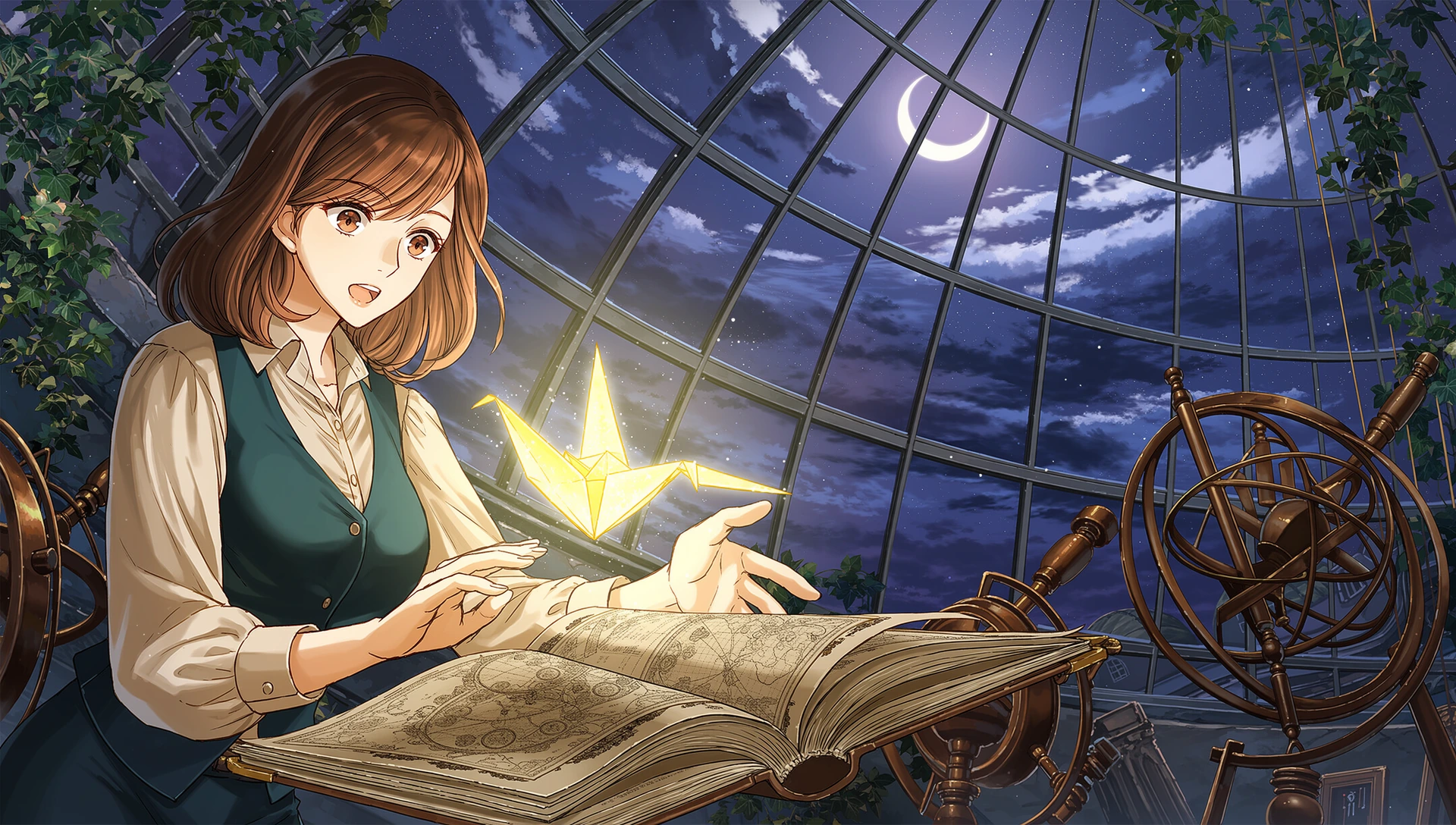
“Choose a visible story moment, then use pose, framing, and light to make it easy to read.”
A single anime fantasy illustration, landscape 16:9, without typography. In an abandoned glass-roofed observatory, an adult cartographer discovers a glowing paper bird rising from an open atlas.
Place her in the left foreground, shown from the waist up, with chestnut hair, a cream shirt, and a teal waistcoat. One hand rests on the book; the other is open beneath the bird. Her eyes follow it, with raised eyebrows and a slightly open mouth.
Make the bird the brightest small element. Warm light from the atlas illuminates her face and hands; cool moonlight outlines her shoulder. Keep the sky, instruments, and ivy subdued. Refined anime linework and cel shading. Keep the face, bird, and book clearly separated.
"A glowing paper bird rising from an open atlas" connects the character and the objects through an action. It gives the scene a story beyond a list of fantasy details.
"Her eyes follow it," "raised eyebrows," and "a slightly open mouth" translate surprise into observable features. The pose explains how she relates to the bird.
"The brightest small element" gives the bird emphasis, while the subdued background supports the setting. Separating the face, bird, and book keeps the key story elements readable.
To replace the bird with a floating constellation, update the event, pose, and lighting together:
A small constellation rises from the atlas. She raises an open hand beneath the stars. Pale blue light illuminates her face and hands.
Remove the remaining bird references and the warm atlas-light instruction.
Use "full-body view, hair and boots inside the frame." Remove conflicting phrases such as "close-up" or "waist-up." If the layout is crowded, request fewer views.
Give each person one action and place shared objects on a clear surface. Replace complicated hand contact with a simpler pose before adding detail.
Specify the focal subject, its position, and its lighting. Remove background objects that distract from it. "More detail" will not necessarily make the main subject clearer.
When a map becomes a town outside the window, revise the pointing direction and gaze too. When a glowing bird becomes blue stars, update the object, pose, and light together.
Treat each revision as a test. Keep the model and available generation settings consistent, and compare several results before deciding which wording helps.
Write a prompt with your subject, setting, composition, and preferred style.
Use NovelAI image generation to explore your idea and refine the result.
Organize your images in OiiOii, or continue with a storyboard and video project.
Bring your NovelAI images into a larger creative workflow in OiiOii.
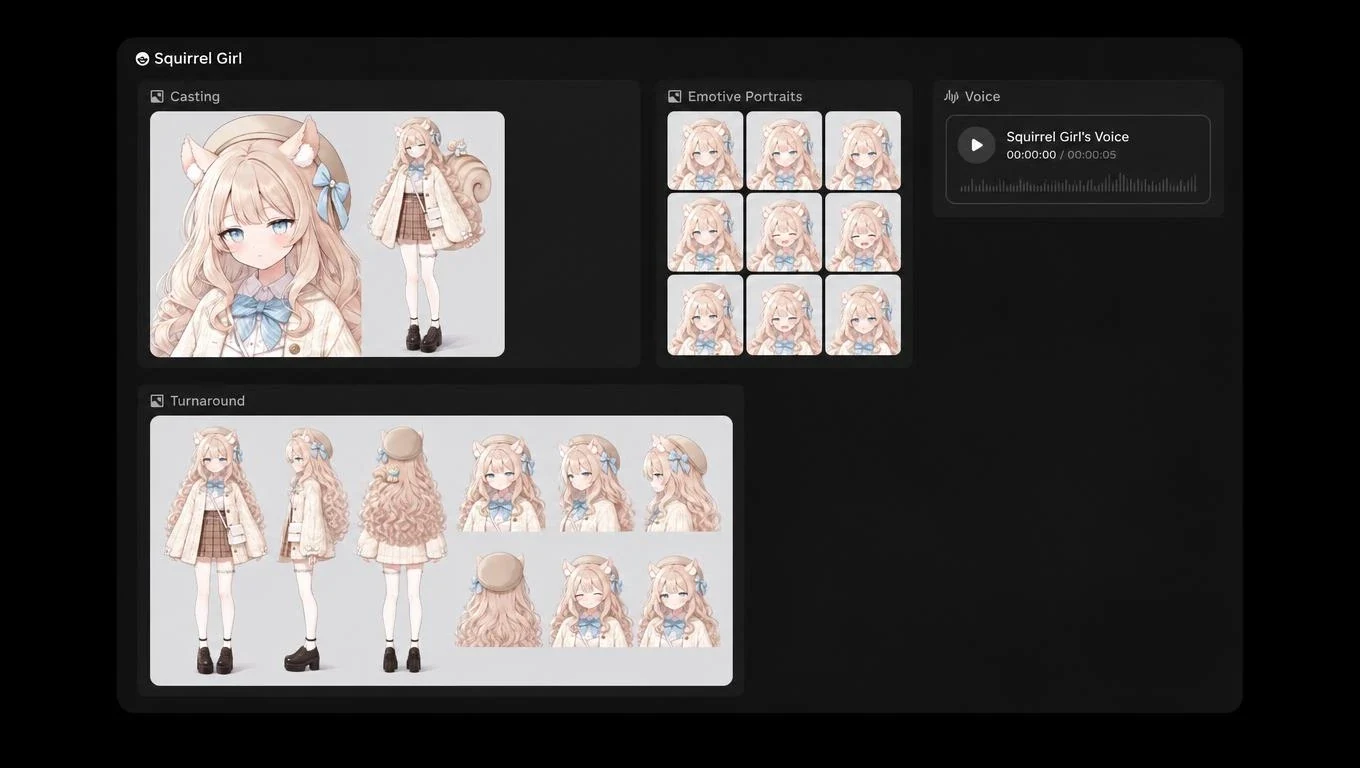
Organize your generated images as your story develops.
Develop a storyboard, continue with OiiOii's video tools, and add music and voice. Video generation uses the video model you select.

Prompt:Create a polished 15-second widescreen 16:9 anime story scene from the supplied illustration. Preserve exactly these two adult travelers, their face shapes, skin colors, clothing, the teal-coated woman with dark blue bob and copper streak and the auburn-haired man in charcoal jacket, and the warm wooden observation carriage. Preserve sophisticated hand-drawn 2D anime linework and cel shading throughout, not 3D or live action. A complete meaningful mini-story: deciding their next destination. 0-5s: begin in the supplied two-shot. With her existing pointing hand the woman traces a short route on the map resting on the small table, then stops at one destination. The man looks down attentively, hands remain in pockets. Gentle train movement, distant mountains slowly passing. 5-9s: clean cut to a closer two-shot; she looks up, he gives a single small affirmative nod and a warm smile. No speech or lip-sync. 9-15s: clean cut to an over-shoulder view behind both travelers as they turn their gaze toward the glowing mountain town outside the broad train window. Slow gentle push toward their destination, ending on a clear hopeful view of the town. Intentional restrained acting, realistic hand anatomy, no touching hands, no extra fingers, no additional people, no morphing, no flickering faces, no random swaying. Soft train ambience and restrained instrumental adventure music, no vocals, no subtitles, no text, no logos, no watermark.
Bring a NovelAI illustration to life with OiiOii. Two travelers plan their next stop. Video generated with Seedance 2.5.
NovelAI provides AI image generation for anime-style artwork. In OiiOii, you can use the NovelAI image generator to create illustrations and continue developing your project with OiiOii’s creative tools.
Create anime illustrations, original characters, portraits, game character concepts, and detailed fantasy scenes. These can support character creation, light fiction artwork, and visual novel projects for illustrators, game developers, and storytellers.
Keep your generated images, characters, and scenes together in one workspace. Continue with storyboards and video creation, then add music and voice using OiiOii’s tools. Video generation uses the video model you select.
Enter your idea in the input box and start creating with the selected model. Refine your prompt and keep the results you want to develop further.
Describe the subject, action, setting, composition, and style. Start with one clear idea, then adjust the details as you review your results.
OiiOii offers free access to get started. Generation uses Credits, and paid options are available. Check the Credits required before generating.
Create an image with NovelAI, then see where your story takes you.